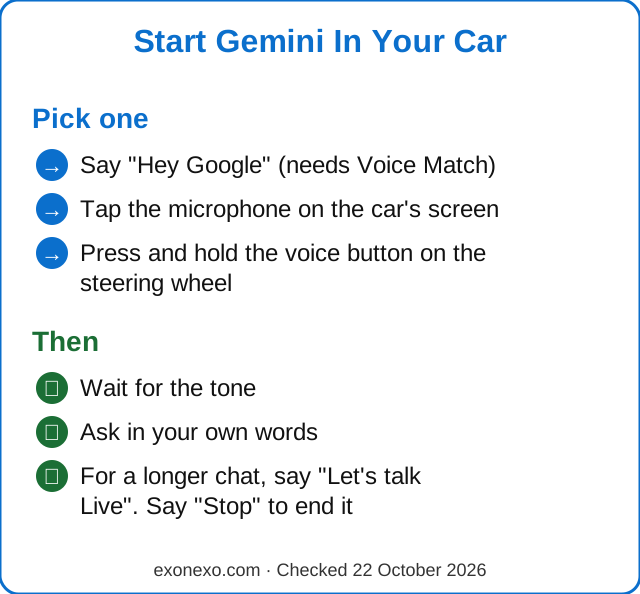
If your car has Android Auto, or Google built in, you can talk to Google's Gemini assistant while you drive. Say "Hey Google", tap the microphone on the car's screen or hold the voice button on the steering wheel, then ask in your own words. iPhone drivers in the USA can now use Gemini inside Google Maps on Apple CarPlay, with more countries to follow.
Works with: Android phones on Android Auto, cars with Google built in, and Google Maps on Apple CarPlay (USA first).
Quick Steps
Connect your Android phone to the car with Android Auto, or use a car with Google built in.
Make sure Gemini is set as your assistant.
Say "Hey Google", tap the microphone or hold the steering wheel voice button.
Ask in your own words. Say "Stop" to end a Live chat.
What Can Gemini Do In The Car?
Gemini is Google's AI assistant. On most Android phones it is replacing the older Google Assistant, and in October 2026 Google said it is now available on Android Auto and in cars with Google built in around the world. The big difference is that you don't have to remember set commands. You can speak the way you would to a passenger.
Google lists these everyday jobs:
Calls and texts. "Call Mom", or "Tell Leo I'm stuck in traffic and add my arrival time." You can add to a message without starting again, and Gemini can translate it into more than 40 languages.
Finding places. "Find a coffee shop on my route that's open now." You can then ask follow-up questions, such as whether it's dog-friendly.
Music. "Play something upbeat for a rainy drive." You don't need to know a song name.
Your email and calendar. Gemini can read out a summary of unread emails in Gmail, or find a hotel address in a booking email and start directions.
A proper conversation. With Gemini Live you can chat about a place you're driving to, play a quiz or practise a speech.
What Do I Need To Use It?
There are two ways to have Gemini in the car. Which one you have depends on your car.
Android Auto (your phone, shown on the car's screen)
An Android phone running Android 11 or newer, with at least 2 GB of memory (RAM).
Gemini set as your phone's digital assistant. If you already use the Gemini app on your phone, you may be set up already.
A car that supports Android Auto.
Once it's ready for you, Google says a small tip appears on your car's screen.
Cars with Google built in
Sign in to the car with your Google account.
On the car's screen, go to Settings, then Google, then Assistant, and choose Gemini.
If Gemini isn't in the list, the car's software may need updating.
Gemini and Android Auto aren't available in every language and region, so if you can't see it, it may not have reached you yet.
How Do I Start Talking To It?
Connect your phone to the car first. Then pick whichever of these feels easiest:
Say "Hey Google". This only works if Voice Match and "Hey Google" are switched on in your phone's settings.
Tap the microphone on the car's screen.
Press and hold the voice button on your steering wheel, if your car has one, until Gemini starts.
Wait for the tone, then say what you want. You don't have to word it perfectly. If you forget something, just add it: "Oh, and avoid toll roads."
Three ways to start Gemini in the car, and what to do next.
How Do I Have A Longer Chat With It?
For a free-flowing conversation, tap the microphone and say "Let's talk Live", or say "Hey Google, let's talk live". This is called Gemini Live. It's good for long drives:
"I'm driving to St. Louis. Can you be my tour guide and tell me some fun facts about it?"
"Ask me some trivia questions about 1960s music."
"I'm giving a speech at a wedding on Saturday. Let's practise."
To end a Live chat, say "Stop". For now, Google says you can only start and stop Live with your voice.
Can I Use Gemini With An IPhone And Apple CarPlay?
Partly. From 21 October 2026, Google Maps on CarPlay lets you talk to Gemini while you're navigating. Start a route in Google Maps, then tap the Gemini icon on the right-hand edge of the car's screen. You can ask things like "Start navigating me there, but avoid toll roads", or report a hold-up on the road.
It's available in the USA now, and the rollout to other countries is under way. Outside Google Maps, an iPhone in CarPlay still uses Siri.
What Is Personal Intelligence?
On 20 October 2026 Google began adding Personal Intelligence to Gemini on Android Auto, with cars with Google built in to follow in the coming months. If you switch it on, Gemini can look in your own Google apps (Gmail, Google Calendar, Google Photos, Google Maps, YouTube and Search) to answer you. For example:
"What's my flight gate, and is my flight on time?"
"Take me to my doctor's appointment." It finds the address in your calendar.
"Find the car wash from the photo I took last week and take me there."
It's off until you choose to turn it on, and you can turn it off at any time in Gemini's settings. It's only for personal Google accounts of people aged 18 and over, and it isn't available in the UK, the European Economic Area, Switzerland or Nigeria. Everything else in the car still works without it.
Is It Safe To Use While Driving?
Talking hands-free is safer than picking up your phone, but it can still take your mind off the road. Google itself says Gemini in the car is new, can get things wrong, and shouldn't be relied on for anything important or safety-related while you drive.
USA
The rules are set by each state. The Governors Highway Safety Association says 33 states and Washington, D.C. ban all drivers from using a handheld phone, and 49 states ban texting while driving. Its advice is simple: keep your hands on the wheel and your eyes and mind on the road.
UK
It's illegal to hold and use a phone while driving, even at traffic lights. Hands-free voice control is allowed, but you must stay in full control. Holding a phone can mean 6 penalty points and a £200 fine, and police can stop you if you're distracted even when hands-free.
Set your route before you set off. It's one less thing to ask for on a busy road.
Keep chats short in heavy traffic. Save Gemini Live for quiet stretches.
Check where it's sending you. Glance at the destination on the screen when it's safe, and pull over if something looks wrong.
Pull over for anything complicated, like booking or paying for something.
Who Else Can Hear It?
Everyone in the car. Google points out that children may hear answers that aren't right for their age, and that Gemini can sound like a person. It suggests reminding children that it's an AI tool, not a person.
Gemini works like it does on your phone, so your chats can be saved to your Google account. To change that, open the Gemini app, go to Settings, then Activity, and look at Keep Activity. Our guide to Gemini explains what it keeps.
Common Questions
Is Gemini in the car free?
Gemini is free with a Google account, and Google's help pages for Gemini in the car don't mention any extra charge. You need a phone and a car that support it.
Does Gemini work in cars in the UK?
Yes. Google says Gemini is available on Android Auto and cars with Google built in around the world, in many languages. The newer Personal Intelligence feature isn't available in the UK yet.
Do I need a new car?
No. Any car that supports Android Auto works with a suitable Android phone. Newer cars with Google built in have it on the car's own screen.
How do I stop a Gemini Live chat?
Just say "Stop". For now, you can only start and stop Live with your voice.
Can it read my emails while I drive?
Yes, if you use Gmail. You can ask for a summary of your unread emails, or ask it to find an address in an email and start directions.
New to all this? Our free AI Starter Guide walks you through the basics, and you can print it.