

Is AI Listening To Me?
Smart speakers and phone assistants listen out for a wake word, like "Alexa" or "Siri", but only start recording and sending what you say once they hear it. Chatbot apps like ChatGPT listen only when you turn voice on. You can check when your microphone is in use and switch it off.
Amazon, Apple and Google settings last checked: 16 October 2026, on their help pages. Menu names can vary by device.
Quick Steps
- Echo: press the microphone button to mute it (red light).
- iPhone: an orange dot means the microphone is in use.
- Delete Alexa recordings: More, then Alexa Privacy.
- Check app microphone access in your privacy settings.
Is My Amazon Echo Recording Everything I Say?
No. Amazon says Echo devices listen only for the wake word, usually "Alexa". No audio is stored or sent to Amazon until the device hears it, or until you press the Action button.
When it hears the wake word, the light ring turns blue (or a blue bar appears on an Echo Show). What you say next is sent to Amazon to be answered. Sometimes it wakes by mistake when it hears something that sounds similar.
If you've joined Alexa+, Amazon turns on Follow Up Mode. That lets you ask another question without saying "Alexa" again, and the light shows when it is still listening.
How Do I Control What Alexa Keeps?
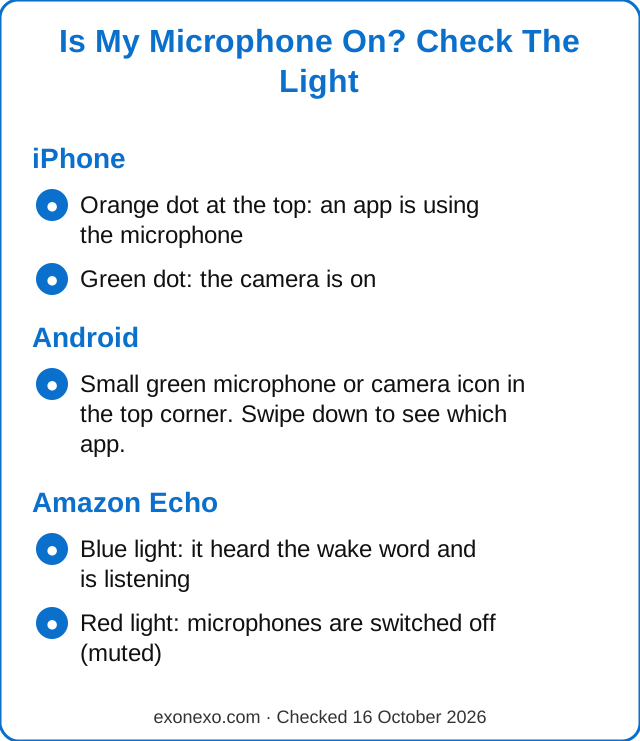
- Mute it: press the microphone button on top of the Echo. The light turns red and the microphones are switched off.
- See and delete recordings: in the Alexa app, tap More, then Alexa Privacy. You can review and delete voice recordings and transcripts there.
- Delete automatically: in the same place, you can choose to delete recordings after 3 or 18 months, or not to save voice recordings at all.
- Hear a beep when it's listening: in the Alexa app settings you can turn on a short tone that plays whenever audio is sent to Amazon.
Is Siri Or Google Listening On My Phone?
Siri on iPhone and Google's assistants on Android wait for a wake phrase, or for you to hold a button, before they start listening properly.
- iPhone: open Settings, then Apple Intelligence & Siri (or Siri on older phones), and choose whether Siri listens for "Siri" or "Hey Siri". You can turn it off and use the side button instead.
- Android: open the Google app or Gemini app settings and look for Hey Google & Voice Match to turn the wake phrase on or off.
Want Gemini off your Android phone altogether? See how to turn off Gemini and Galaxy AI.
How Can I Tell If My Microphone Is On?
- iPhone: Apple says an orange dot at the top of the screen means an app is using the microphone. A green dot means the camera is on (sometimes with the microphone too). Swipe down to open Control Center and see which app used it.
- Android: a small green microphone or camera icon appears in the top corner. Swipe down to see which app is using it.
Do Chatbot Apps Listen To Me?
ChatGPT, Gemini, Claude and Copilot hear you only when you tap the microphone or voice button. OpenAI says a ChatGPT voice conversation can keep going if you switch to another app, so tap the exit button when you've finished.
What you type or say may be stored by the company. Treat it like a postcard, not a sealed letter. See does ChatGPT remember what you tell it?
Why Did I See An Advert For Something I Only Talked About?
It feels spooky, and it is a very common worry. Adverts can be chosen using what you search for, the websites you visit and where you go, so a coincidence can feel like eavesdropping. You can check which apps are allowed to use your microphone (below) and switch off any that don't need it. That way you know for certain.
How Do I Check Which Apps Can Use My Microphone?
- iPhone: Settings, then Privacy & Security, then Microphone.
- Android: Settings, then Security & privacy (or Privacy), then Permission manager, then Microphone.
- Turn off any app that doesn't need it. You can always turn it back on.
Worried about a strange call that sounded like someone you know? AI can copy voices. Read how to spot an AI voice-cloning scam.
Common Questions
Is Alexa listening all the time?
Amazon says Echo devices listen only for the wake word. Nothing is recorded or sent to Amazon until the device hears it or you press the button. Press the microphone button to switch the microphones off.
How do I delete my Alexa recordings?
In the Alexa app, tap More, then Alexa Privacy. You can review and delete recordings there, or set them to delete automatically.
What does the orange dot on my iPhone mean?
It means an app is using the microphone. A green dot means the camera is in use.
Is my phone listening to my conversations for adverts?
Adverts can be chosen using your searches, the sites you visit and your location. You can check which apps have microphone access in your privacy settings and turn off any you don't trust.
Does ChatGPT listen when I'm not using it?
No. It hears you only during a voice conversation or when you tap the microphone. End voice conversations with the exit button.
New to all this? Our free AI Starter Guide walks you through the basics, and you can print it.
Sources
Last checked 16 October 2026.
Read Next
Does ChatGPT Remember What You Tell It?
Memory, deleting chats, Temporary Chat and training settings.
Meta AI In WhatsApp And Facebook
What it is, what it can see, and how to limit it.
Is ChatGPT Safe?
What not to type, fake apps and how to lock your account.
Get The Weekly exonexo Email
A short email every Thursday with new guides, one useful tip and the AI news that matters. Free, and you can unsubscribe at any time. See past issues.
Updated 24 October 2026